 dminWiki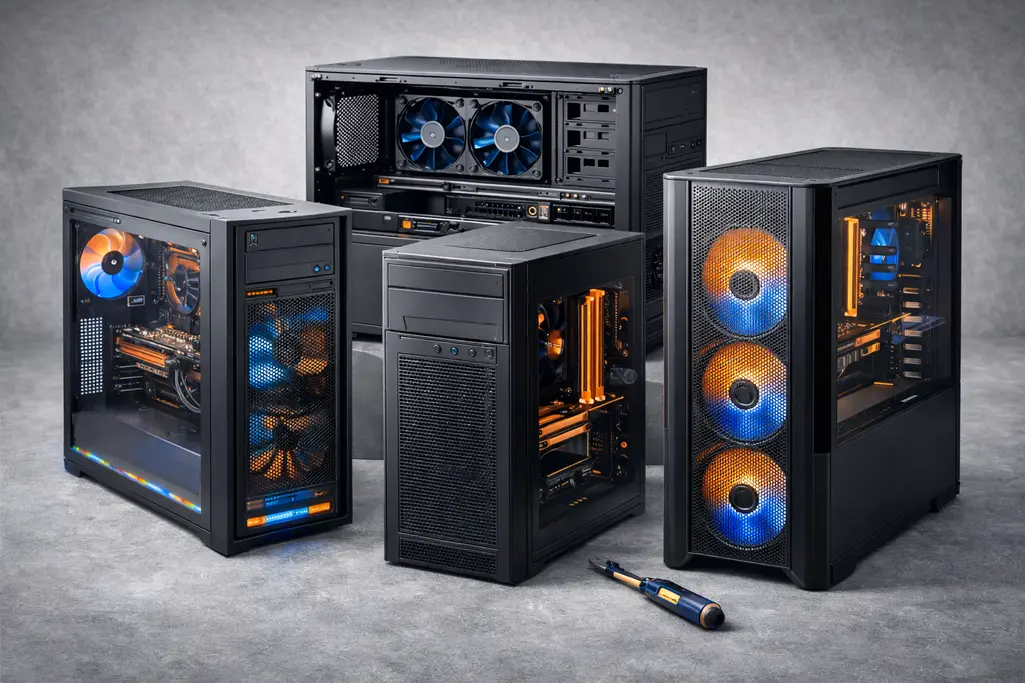
A PC case (also called a chassis) is the physical enclosure that houses and protects all internal computer components such as the motherboard, power supply, storage devices, and cooling hardware. Beyond simple protection, the case plays a critical role in cooling efficiency, hardware compatibility, noise levels, expandability, and even security. Choosing the right case is therefore both a technical and practical decision.
Purpose of a PC Case
A case provides:
- Structural support – Keeps components securely mounted and aligned.
- Airflow control – Directs cool air to hot components and exhausts warm air.
- Safety and reliability – Protects hardware from dust, physical damage, and accidental contact.
Form Factor
PC cases follow standardized sizes known as form factors, which define which motherboard sizes and component layouts are supported. This prevents compatibility issues and simplifies system planning.
Full Tower
- Largest common consumer cases (typically ≥ 60 cm tall).
- Support all motherboard sizes up to Extended ATX (E-ATX).
- Provide extensive internal space for multiple GPUs, custom liquid cooling loops, and large numbers of drives.
- Typically used in high-end gaming systems, workstations, and enthusiast builds where expandability is critical.
Mid Tower
- Most common case size (approximately 45–55 cm tall).
- Supports motherboards up to ATX.
- Offers a strong balance between size, airflow, and expandability.
- Widely used for general-purpose desktops and gaming PCs.
Mini Tower
- Smaller than mid towers (approximately 35–45 cm tall).
- Supports Micro-ATX (mATX) and Mini-ITX motherboards.
- Fewer expansion slots and drive bays compared to larger cases.
- Well suited for office PCs, budget builds, and systems with limited upgrade needs.
Small Form Factor (SFF)
- Very compact designs, sometimes console-sized.
- Typically support Mini-ITX motherboards only.
- Limited internal expansion and cooling options.
- Popular for space-constrained environments, portable systems, and home theater PCs (HTPCs).
Open vs. Closed Cases
Cases can broadly be categorized by how enclosed their structure is.
Closed Cases
- Traditional design with solid or ventilated panels enclosing all sides.
- Provide protection against dust, accidental contact, and electromagnetic interference (EMI).
- Generally quieter due to sound-dampening panels and controlled airflow.
- Common in consumer, business, and enterprise environments.
Open Frame Cases
- Components are exposed or mounted on an open metal frame.
- Excellent airflow and immediate access to components.
- Primarily used for bench testing, hardware diagnostics, extreme overclocking, or display builds.
- Offer little protection from dust, noise, or physical damage and are not suitable for most production environments.
Common Features
Modern PC cases include a variety of features that affect usability, cooling, and long-term reliability.
Cooling Support
- Mounting points for multiple fans (120 mm and 140 mm are most common).
- Support for liquid cooling radiators of various sizes.
- Airflow-focused designs prioritize mesh panels, while silent cases emphasize restricted airflow with noise damping.
Drive Bays
- 3.5" bays for traditional hard disk drives (less common in modern consumer cases).
- 2.5" bays for solid-state drives.
- Some modern cases eliminate fixed drive cages entirely to improve airflow and rely on motherboard-mounted NVMe storage.
Expansion Slots
- Define how many PCIe cards (GPUs, network cards, capture cards) can be installed.
- ATX cases typically provide 7 expansion slots, with larger cases offering more.
Cable Management
- Routing cutouts behind the motherboard tray.
- Tie-down points, Velcro straps, and PSU shrouds.
- Improves airflow and simplifies maintenance while keeping the interior visually clean.
Front Panel I/O
- Commonly includes USB ports (USB 2.0, USB 3.x, USB-C), audio jacks, and power/reset buttons.
- Optical drive bays are increasingly rare in favor of cleaner front panel designs.
Dust Filters
- Removable mesh filters on intake fans.
- Reduce dust buildup and improve long-term system reliability.
Side Panels
- Tempered glass panels allow visibility of internal components and RGB lighting.
- Solid panels prioritize durability, noise reduction, and security.
Tool-less Design
- Drive trays, side panels, and expansion slots that do not require screws.
- Speeds up installation and upgrades.
Power Supply Placement
- Bottom-mounted PSU (modern standard) improves airflow and stability.
- Top-mounted PSU designs are mostly found in older cases.
Hot-Swap Drive Bays
- Allow drives to be inserted or removed without opening the case.
- Common in servers and workstations, rare in consumer desktops.
Security and Enterprise Features
Some cases include features designed for managed or shared environments.
- Intrusion detection switches that notify the BIOS or operating system when the case is opened.
- Lockable side panels to prevent unauthorized access or tampering.
- These features are most commonly found in business desktops, kiosks, and servers.
Summary
While often overlooked, the PC case directly impacts system performance, reliability, and usability. Selecting the appropriate case requires considering form factor compatibility, cooling requirements, noise tolerance, expansion needs, and security expectations. In enterprise or administrative environments, consistency and serviceability may be more important than aesthetics, while enthusiast systems may prioritize airflow and customization.